Uptime monitoring
that won't go quiet.
Checks, incidents and status pages for your sites, APIs and cron jobs. Built so the alert still arrives when our own infrastructure is the thing having a bad day.
- 7 kinds of check
- Alerts that outlive our own outages
- Status pages included

Services
Live10s ago · every 30s
Checks for anything
HTTP, ping, port, DNS, SSL, keywords and cron heartbeats.
Alerts
Email, Slack, webhook or Telegram, logged before they’re sent.
Status pages
On your own domain, in your colours, updated by the checks themselves.
One project per client
Real boundaries, not one long list with tags on it.
Most tools give you one flat list
Every site is another row in the same list. At two hundred rows, the only thing linking a monitor to its client is a naming convention you invented.
Bakers Ltd's checkout is down. Go find it.
Bakers Ltd's checkout is down. You already found it.
Every client gets their own project
A project isn't a folder. It gets its own services, status page, history and subscribers, so forty clients never see each other.
workspace / project / service / monitor
- Their own status page
- One page per project, showing only that project’s services, with its own subscribers and 90 days of history.
- Their own monitors
- HTTP, ping, port, DNS, SSL, keyword and cron heartbeat checks, grouped under that project’s services and nothing else’s.
- Their own domain
- Point status.yourdomain.com at us. We’ll walk you through the TXT record and sort the certificate.
- Your brand on all of it
- Your logo, your colour, no pinguHQ footer. Whoever reads it sees you, not us.

Seven kinds of check: HTTP, keyword, cron, SSL, DNS, port, ping
Alerts by email, Slack, Telegram or webhook
Per member, plus status page subscribers
Slack
Incoming webhook, per channel
Telegram
Your own bot token, per workspace
Webhook
Signed POST, your endpoint
transactional outbox
Every alert is written to Postgres before it’s sent, then drained with retries. Lose the queue and the alert still goes.
A status page for every project, on your own domain
no pinguhq branding · your domain · your logo
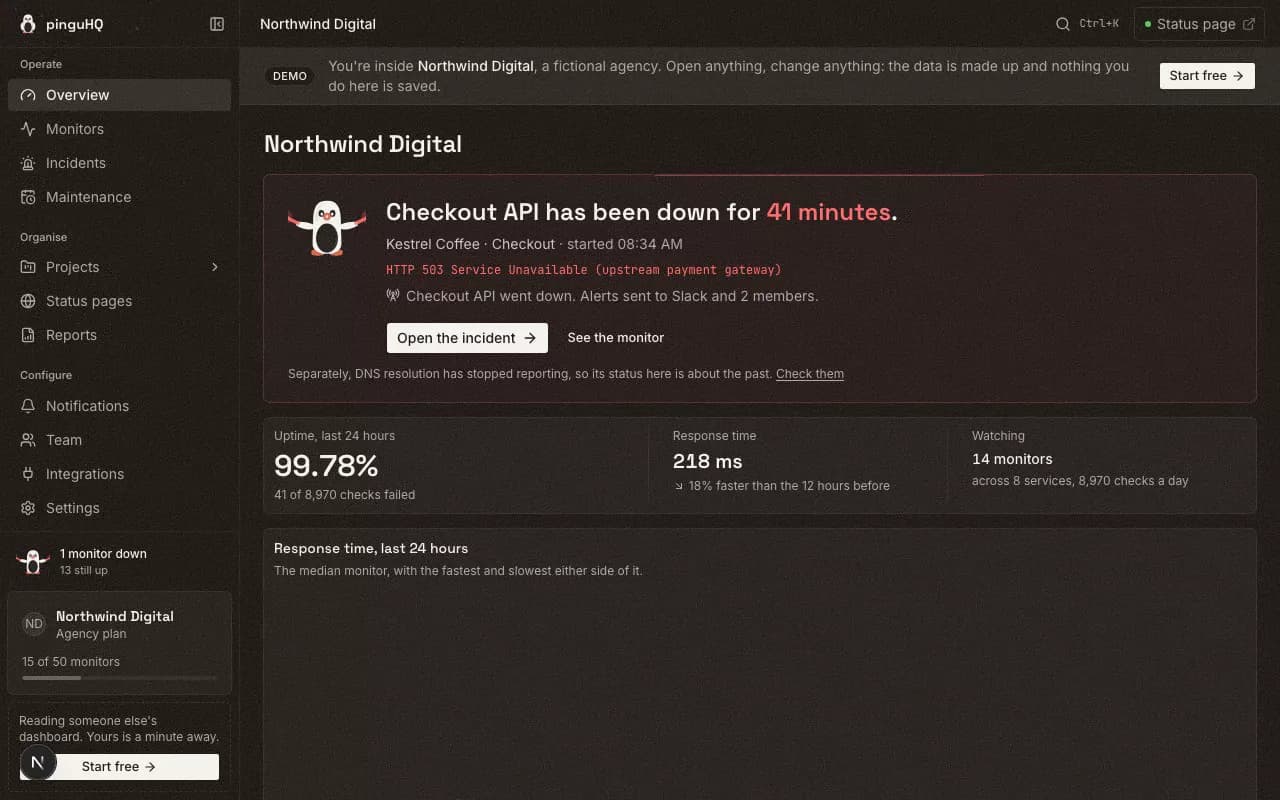
See it running, without signing up
Recordings of our public demo workspace, not mockups. Open it and click around. No account needed.
A check fails and the rest happens on its own
An incident opens, your team gets told, and the status page updates. Nobody has to be awake for it. Scroll to walk the chain.
Checking
Every monitor that’s due gets picked up and run. They don’t share a clock, so checks land spread out instead of all at once.
Degrading
One endpoint starts answering slowly. Every check records its response time, so you can see it sliding before it breaks.
Incident opened
The check fails, gets confirmed, and an incident opens by itself. Nobody had to notice first. Nobody had to click anything.
Alerting
Email, Slack, webhook and Telegram. Alerts get written down before they’re sent, so if the queue dies they still go out.
Customers told
The right status page updates, and only that one. Its subscribers get an email at the same time.
Resolved
The next passing check closes the incident and logs how long it lasted. The page goes green without anyone editing it.
Make it look like yours
Change the theme, accent, texture, density, corners and motion. Status colours never change: up is green, down is red, no data is slate.
Acme Co
5 monitors · 1 incident open
Three surfaces. Status colour is the same on all of them.
You’ll have a check running in about a minute
Nothing to install. Here are the three things people set up first, with the real commands.
No agent, no config file. Name it, paste the URL, and checks start.
The free plan gives you ten monitors on five-minute checks, and you can use it on work you’re paid for. Start with those.
We’ll move everything over for you
Two hundred monitors with their alert contacts and status pages is a week of work. We do it for you, by hand, before you pay anything.
Coming from

UptimeRobot
Monitors, intervals, alert contacts

Pingdom
Uptime and transaction checks

Better Stackone click
Self-serve: paste a token, preview, import

Atlassian Statuspage
Components, incident history, subscribers

Oh Dear
Sites, checks, site groupings

Uptime Kuma
Monitors and notification targets
On something else? Ask anyway. If it has an API or an export, we can usually read it.
- 1
Paste a token, or send us one
Send us a read-only key. It can’t change anything in your current tool, and you can revoke it when we’re done.
- 2
Every monitor gets sorted first
You see every monitor sorted into imports cleanly, needs a tweak, or can’t come across. Nothing is dropped quietly.
- 3
You confirm, then click through it
Nothing is created until you say go, and you can change any grouping or name afterwards.
- 4
You switch when you’re ready
Point your DNS at us and turn the old tool off. Both run side by side until you do.
you send
- 203 monitors
- one flat list
- 92 alert contacts
- no status pages
you get back
- 41 projects
- 118 services
- 203 monitors
- 41 status pages
Nothing switches until you say so. Your old tool keeps running the whole time.
What the others charge extra for
White-label, private pages, single sign-on, subscriber counts. Here's the same shopping list priced across the tools you're choosing between.
Cheapest paid plan$54 othershide
- Oh Dear
- $17covers 2 sites
- Better Stack
- $34 per responder
- Statuspage
- $29
 Instatus
- $20
Free plan10 monitorscommercial use allowed4 othershide
- Oh Dear
- None
- Better Stack
- 10 monitors1 page
- Statuspage
- 100 subscribersno monitoring
- Instatus
- 15 monitors
Remove their brandingIncluded from $49, on every page4 othershide
- Oh Dear
- Included on every plan
- Better Stack
- $250 per pageper month
- Statuspage
- The $399 plan
- Instatus
- Not offered
Private or internal pageOn the roadmap4 othershide
- Oh Dear
- Included
- Better Stack
- $50 per pageper month
- Statuspage
- A separate product, $79 to $1,499
- Instatus
- The $300 plan
Status page subscribersNot counted, not charged4 othershide
- Oh Dear
- Included
- Better Stack
- $40 per 1,000per month
- Statuspage
- 250 at $29rising to 25,000 at $1,499
- Instatus
- 5,000 on the $20 plan
Keeps things separateProjects, each with its own page and domain4 othershide
- Oh Dear
- One account, one flat site list
- Better Stack
- No
- Statuspage
- Audience pages, from $300 each
- Instatus
- No
Fastest check30 seconds4 othershide
- Oh Dear
- Not published
- Better Stack
- 30 seconds
- Statuspage
- No monitoring
- Instatus
- 30 seconds
 pinguHQ
Monthly list prices, read off each vendor's own pricing page in August 2026. Tell us if we've got one wrong.
To whoever is on call
We want the watching to stop being your job.
Uptime tools were built for one company watching its own thing. If you look after sites for other people you are watching forty, on one long list, with a bill that grows every time you win a client.
- You pay for monitors. Nothing else.
- A monitor costs us a check to run, so a monitor is what we count. Status pages, subscribers and team members are never charged for. Projects aren't either; the two cheapest plans just cap how many.
- Green means up. For everyone, on every theme.
- Change the theme, the accent, the texture, the corners. You cannot change what red means, because two people reading the same screen at 3am have to see the same thing.
We publish what we have not built yet, further down this page. And if the only thing keeping you on your current tool is the job of leaving it, say so and we will move you ourselves, for free.
The people building pinguHQ
hello@pinguhq.com. A person reads it.
The same forty projects, priced both ways.
One agency, one month, on Statuspage and on us.
Same forty client pages. $11,901 a month of difference, and none of it buys a single extra check.
A monitor costs us a check to run, so monitors are what we count. Statuspage lists audience-specific pages from $300 each per month, billed per page. Forty of them is $12,000, before any client outgrows the base tier. Read off Atlassian’s own pricing in September 2026.
See what we build nextOpen source gets a fixed cut.
A lot of this product is other people’s work, given away by people funded by nobody. A fixed amount goes out to them every month, starting with our first paid subscription.
Nothing has been sent yet, because we haven’t charged anyone yet. When the first payment goes out, the amount appears here and the list below gets receipts.
None of them asked us to do this, and none of them endorse us.
- BullMQThe queue every monitor check is scheduled through.
- RechartsEvery latency chart and uptime sparkline in the dashboard.
- ZodValidates every input boundary, including the env schema.
- Base UIThe dialogs, selects and popovers, and their focus behaviour.
- LucideEvery icon on this page and in the product.
- tailwind-mergeBehind cn(), which composes the class names of every component.
- Three.jsDraws the alert-pipeline scene and the texture field on this site.
- React Three FiberPuts those two scenes into React, and unmounts them cleanly.
You get a say in what we build next
Everything here is something pinguHQ doesn’t do today. Better you read it now than find out after you’ve moved across. Push the ones you need.
- Self-serve import from UptimeRobot and PingdomIn build
Better Stack already imports itself from Settings. These two are next; today a person does them for you by hand.
- Email template passIn build
Alerts and subscriber mail work and are durable. The templates haven’t had a design pass.
- On-call and escalationPlanned
Rotations, schedules, escalation policies. Today an alert goes to a channel, not to a person on a rota.
- Alert routing per projectPlanned
Notification channels are scoped to the workspace right now, not to a project.
- Private status pagesPlanned
Pages are public or unlisted today. A password or magic-link login isn’t built.
- Branding per status pagePlanned
White-label is one brand per workspace. Giving each page its own logo and colour isn’t built.
- SMS and phone alertsPlanned
Needs a telephony provider. Email, Slack, webhook and Telegram ship today.
- Multi-region checksPlanned
Checks run from one region. A second confirming location is a hosting decision we haven’t made.
- SLO and SLA reportingConsidering
Raw uptime percentage ships. Error budgets and contractual reporting don’t.
- Client-facing PDF reportsConsidering
CSV export ships. A branded monthly PDF doesn’t.
- Browser and transaction checksConsidering
Scripted multi-step journeys. Keyword checks catch some of this today.
- SAML single sign-onConsidering
Google and magic link work. SAML doesn’t.
Wanted something that isn’t here?
Votes are saved in this browser only, so send yours over when you are ready.
The things you'd ask before signing up
Including the one most tools leave out.
What can pinguHQ monitor?
Seven kinds of check: HTTP, ping, port, DNS, SSL certificate expiry, keyword (a page can return 200 and still render an error), and cron heartbeats, where your job pings a URL when it finishes and we alert you if the ping never comes.
How much does pinguHQ cost?
The free plan covers 10 monitors with no card and no clause saying it has to be a hobby project. Paid plans start at $5 a month for 25 monitors. Pricing is per monitor: status pages and status page subscribers are never counted or charged. Projects are not billed either, though the two lowest tiers cap how many you can have (1 on Free, 5 on Developer) and it is unlimited from $19 a month.
How often does pinguHQ check my site?
Every five minutes on the free plan, every 60 seconds on Developer at $5 a month, and every 30 seconds on Team at $19 a month and above. Thirty seconds is the fastest interval we run.
How does pinguHQ send alerts?
Email, Slack, a generic webhook, and Telegram. Alerts are written down before they are sent, so the record of what we tried to tell you survives an outage of our own. SMS and phone alerts are not built yet.
Is a status page included?
Yes, on every plan including free. The page updates from the checks themselves rather than from someone remembering to edit it. When an incident is over you can publish a postmortem to it, and your customers read it there. Your logo and your colour are on every plan, your own domain from $5 a month, and removing the pinguHQ footer from $49. Subscribers are never counted or charged.
Can I move over from UptimeRobot, Pingdom or Better Stack?
Yes, and we do the move by hand before you pay anything. You send an export, we rebuild it as projects, services and monitors with the alert contacts and status pages attached, and you confirm it before anything switches. Your old tool keeps running the whole time.
What has pinguHQ not built yet?
On-call rotations and escalation policies, SMS and phone alerts, SLO and SLA reporting, action-item tracking on postmortems, browser and transaction monitoring, private and password-protected status pages, and SAML single sign-on. Checks also run from one region today rather than several. We would rather you read that here than find it after signing up.
Ten monitors, free.
Enough to cover a real project, on work you're getting paid for. No card, and no clause saying it has to be a hobby project.
- No card needed
- Fine for paid work
- Enough for a real project